
• Home
  • About Me
  • Contact
  • German
  • TestPage

Microsoft BizApps Finance & Controlling

Microsoft BizApps Finance & Controlling

Tag Archives: T-account

T-Account journal feature

04 Thursday Jun 2015

Posted by Ludwig Reinhard in General Ledger

≈ Comments Off on T-Account journal feature

Tags

Dynamics AX 2012, Split posting, T-account

If you ever got furious about the standard Dynamics AX “breakdown of voucher” functionality, the following post might provide you with an alternative solution that can easily be implemented.

Let’s start by having a look at the standard Dynamics AX breakdown of voucher functionality and how it is used for entering the following invoice details:
EN_21_090

Entering this invoice requires the following steps:

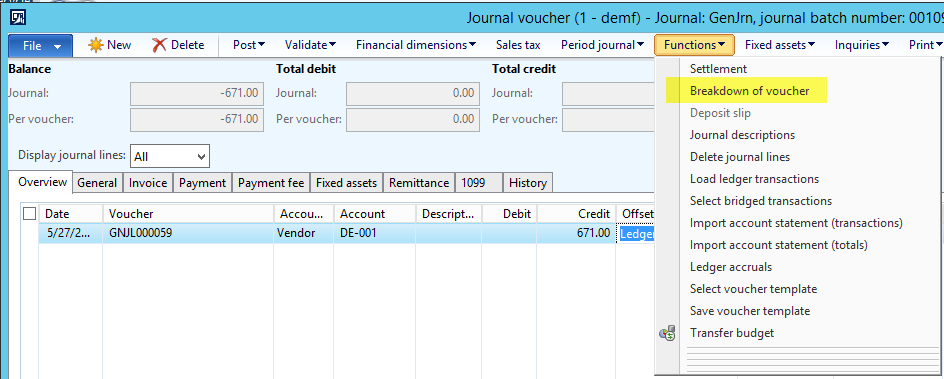
Step 1: Select the vendor, enter the invoice amount, then select “Functions-Breakdown of voucher”
EN_21_100

Step 2: Break down the invoice by entering the tax details and the gross and net amounts in the upper section of the form and the ledger account information in the lower part of the form. (This step can easily become very awkward especially if you have to enter numerous invoice lines with different tax details that require navigating between the upper and lower section of the form)
EN_21_110

Step 3: Once debit and credit balances match, select the update button to transfer to invoice line details to the journal
EN_21_120

Now let’s have a look at the T-account feature and how you can enter the same invoice details using this functionality.

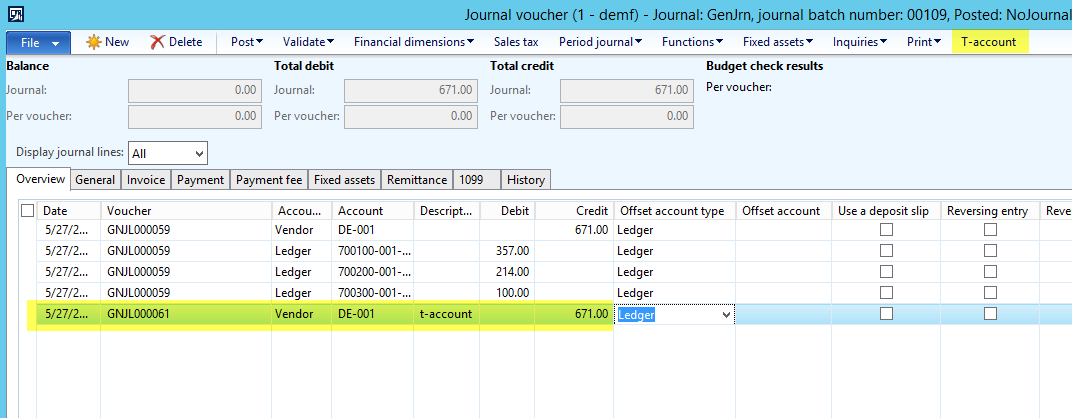
Step 1: Select the vendor, enter the invoice amount, then select “T-account”
EN_21_130

Step 2: In the T-account form, you can find the credit transaction that has been entered in the journal voucher form.
EN_21_140
Complete your transaction by entering the debit transactions as required.EN_21_150
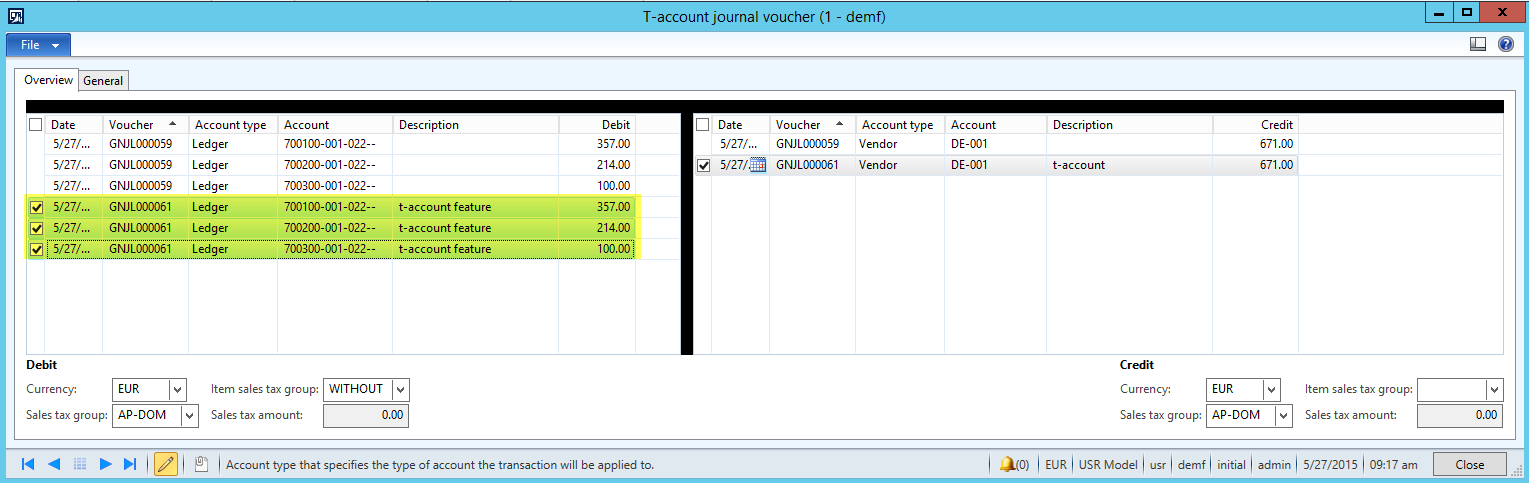
Note: You can personalize this form as any other Dynamics AX form and incorporate for example the sales tax fields into the debit and credit sections as illustrated in the following screenshot.
EN_21_160

Step 3: Once you close the T-account form, the T-account lines are transferred to the journal voucher form.
EN_21_170

Note: As illustrated, the T-account form provides you with a greater flexibility in regards to entering voucher lines in Dynamics AX. What is more, you are not limited to entering only ledger accounts but you can also select other account types, such as customers, fixed assets, etc. Finally, the T-account form allows you transferring transaction lines to your journal even if debit and credit amounts do not match (see the following screenshots for an example).
EN_21_180
EN_21_190
Transferring incomplete transactions from the T-account form to your journal does not mean that this incomplete voucher can be posted, yet it provides you with more flexibility in the way how you enter vouchers in Dynamics AX.


After illustrating you the functionality of the T-account form, I will show you how this form can be made available for all Dynamics AX users. Making this form available requires the following minor system modifications:

Modification 1: Make the extended data type “LedgerTAccountEnabled_JP” available for the countries you need
DEEN_21_201
As a result, the T-account parameter becomes available in the General Ledger parameters form. Activate this parameter.
DEEN_21_202

Modification 2: In the LedgerParameters table method “isTAccount” enter the iso country codes you require
DEEN_21_203

Modification 3: Enable the country codes you require for the TAccount menu item button in the LedgerJournalTransDailyTAccount form as illustrated in the following screenshot.
DEEN_21_204

Modification 4: Allow editing of the account type in the LedgerJournalTransDailyTAccount form as shown in the next two screens. This adjustment allows you selecting different account types in the t-account form
DEEN_21_205 DEEN_21_206

Modification 5: Adjust the lookup methods for the debit and credit side to enable the lookup of the accounts for the different account types required. Example:
DEEN_21_207

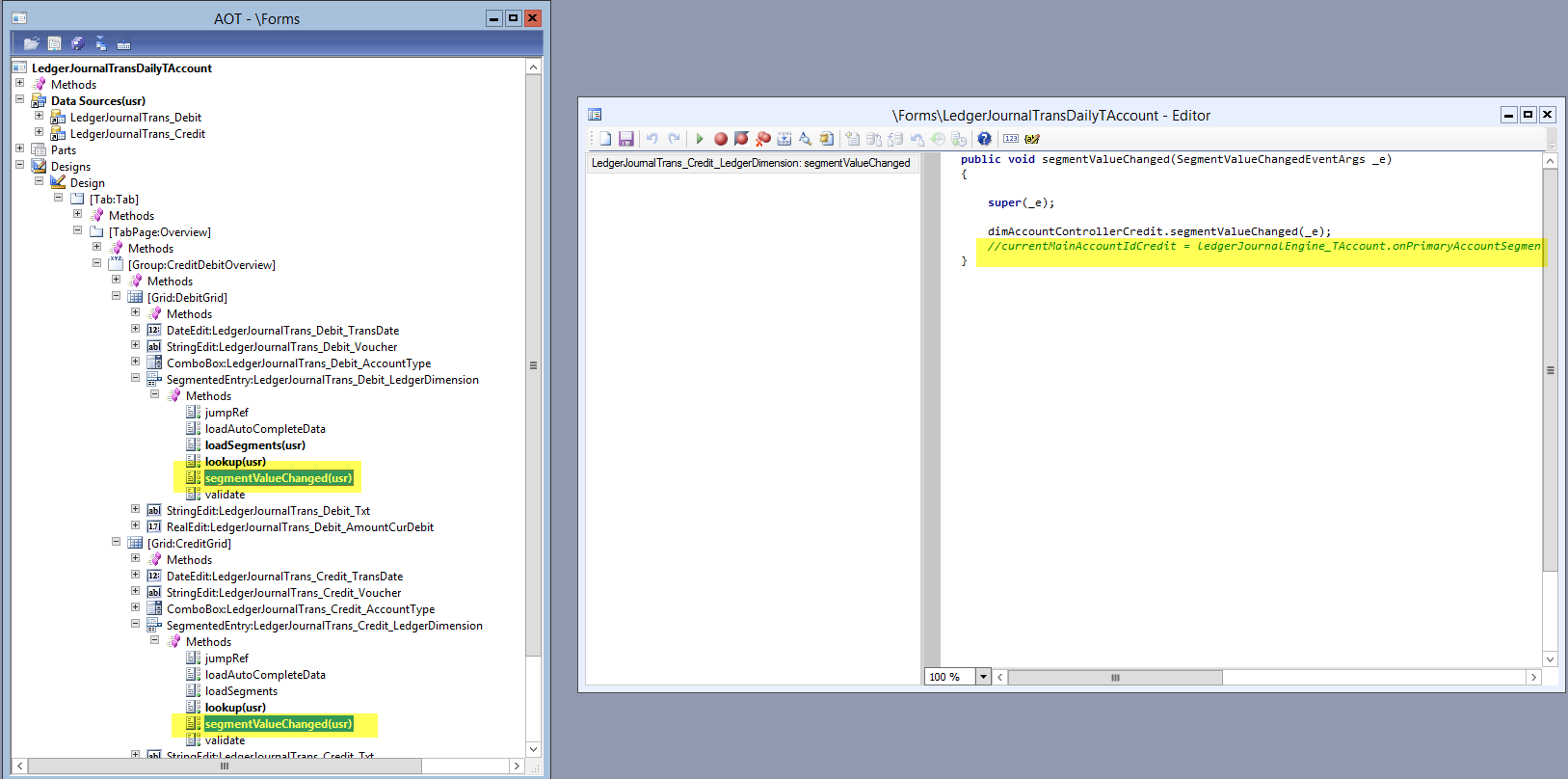
Modification 6: Adjust the SegmentValueChanged methods in the LedgerJournalTransDailyTAccount form as illustrated in the following screen
DEEN_21_208

Modification 7: Change the @GLS60236 label as required
DEEN_21_209

Please note that the T-account form is by default only available in GL daily journals. Yet, making this form available e.g. for AP invoice journals can easily be realized based on the previous system modifications illustrated.

Microsoft BizApps Deutschland Podcast

Dynamics UserGroup Deutschland

Project Accounting Book – Part 2

Project accounting book

Categories

  • Accounts Payable
  • Accounts Receivable
  • Bank Management
  • Book reviews
  • Budgeting
  • Cost accounting
  • Fixed Assets
  • General Ledger
  • Inventory
  • Management Reporter
  • Miscellaneous
  • Podcast
  • PowerPlatform
  • Project
  • Sustainability
  • Uncategorized

Tags

Advanced bank reconciliation AI Allocations Artificial Intelligence Automation Azure Bank reconciliation BizApps Budgeting Controlling Copilot Copilot Studio Cost accounting module Cost center accounting D365 D365FO Dynamics 365 Dynamics AX Dynamics AX 2012 Electronic reporting Email Environment Flow Global Warming invoice invoice recording IOT LEGO Management Accounting MS Flow MT940 PowerApps Power Apps PowerAutomate Power Automate PowerPlatform Power Platform Process Mining Project RPA Security SharePoint Sustainability Sustainability Accounting Sustainability Manager Tax time recording Vendor payments WBS workflow

Enter your email address to follow this blog and receive notifications of new posts by email.

Subcribe

  • RSS - Posts
  • RSS - Comments

Legal

  • Disclaimer

Important Websites

  • Microsoft BizApps Links

Archives

  • July 2025
  • June 2025
  • May 2025
  • April 2025
  • March 2025
  • February 2025
  • January 2025
  • December 2024
  • November 2024
  • October 2024
  • September 2024
  • August 2024
  • July 2024
  • June 2024
  • May 2024
  • April 2024
  • March 2024
  • February 2024
  • January 2024
  • December 2023
  • November 2023
  • October 2023
  • September 2023
  • August 2023
  • July 2023
  • June 2023
  • May 2023
  • April 2023
  • March 2023
  • February 2023
  • January 2023
  • December 2022
  • November 2022
  • October 2022
  • September 2022
  • August 2022
  • July 2022
  • June 2022
  • May 2022
  • April 2022
  • March 2022
  • February 2022
  • January 2022
  • December 2021
  • November 2021
  • October 2021
  • September 2021
  • August 2021
  • July 2021
  • June 2021
  • May 2021
  • April 2021
  • March 2021
  • February 2021
  • January 2021
  • December 2020
  • November 2020
  • October 2020
  • September 2020
  • August 2020
  • July 2020
  • June 2020
  • May 2020
  • April 2020
  • March 2020
  • February 2020
  • January 2020
  • December 2019
  • November 2019
  • October 2019
  • September 2019
  • August 2019
  • July 2019
  • June 2019
  • May 2019
  • April 2019
  • March 2019
  • February 2019
  • January 2019
  • December 2018
  • November 2018
  • October 2018
  • September 2018
  • August 2018
  • July 2018
  • June 2018
  • May 2018
  • April 2018
  • March 2018
  • February 2018
  • January 2018
  • December 2017
  • November 2017
  • October 2017
  • September 2017
  • August 2017
  • July 2017
  • June 2017
  • May 2017
  • April 2017
  • March 2017
  • February 2017
  • January 2017
  • December 2016
  • November 2016
  • October 2016
  • September 2016
  • August 2016
  • July 2016
  • June 2016
  • May 2016
  • April 2016
  • March 2016
  • February 2016
  • January 2016
  • December 2015
  • November 2015
  • October 2015
  • September 2015
  • August 2015
  • July 2015
  • June 2015
  • May 2015
  • April 2015
  • March 2015
  • February 2015

Blog at WordPress.com.

  • Subscribe Subscribed
    • Microsoft BizApps Finance & Controlling
    • Join 619 other subscribers
    • Already have a WordPress.com account? Log in now.
    • Microsoft BizApps Finance & Controlling
    • Subscribe Subscribed
    • Sign up
    • Log in
    • Report this content
    • View site in Reader
    • Manage subscriptions
    • Collapse this bar
 

Loading Comments...