• Home
  • About Me
  • Contact
  • German
  • TestPage

Microsoft BizApps Finance & Controlling

Microsoft BizApps Finance & Controlling

Category Archives: Cost accounting

Cost accounting (15)

08 Wednesday Nov 2017

Posted by Ludwig Reinhard in Cost accounting

≈ Comments Off on Cost accounting (15)

Tags

Controlling, Cost accounting module, Cost center accounting, Management Accounting, overhead rate policy, Statistical measure provider templates

In the previous post, we had a look at how transactions that were recorded in the project module can be used as statistical measure for making cost allocations. This post will introduce two alternative options that illustrate how those allocations can be made.


Option 1: Project module

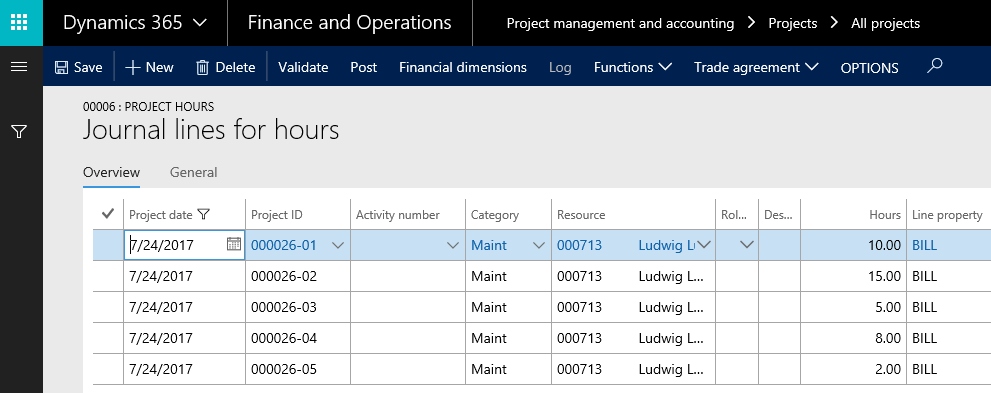
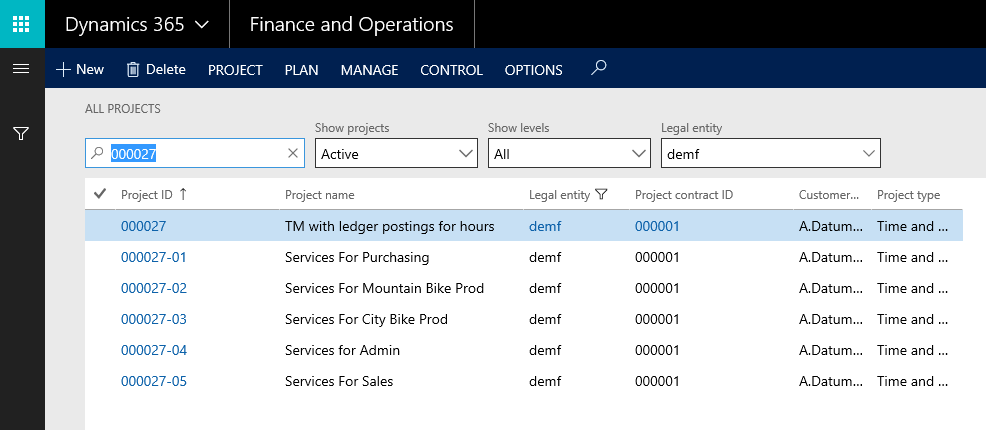
A first possibility how cost allocations between cost centers – based on recorded project hours – can be made is through project costing vouchers. Those vouchers can be realized by making use of a project group that has the ledger integration parameter for hour related postings activated. This is the case for the projects shown in the next screenprint.
Posting the very same hour transactions for the car pool cost center manager that have been recorded in the previous post results in a voucher that is shown in the next screenprint.
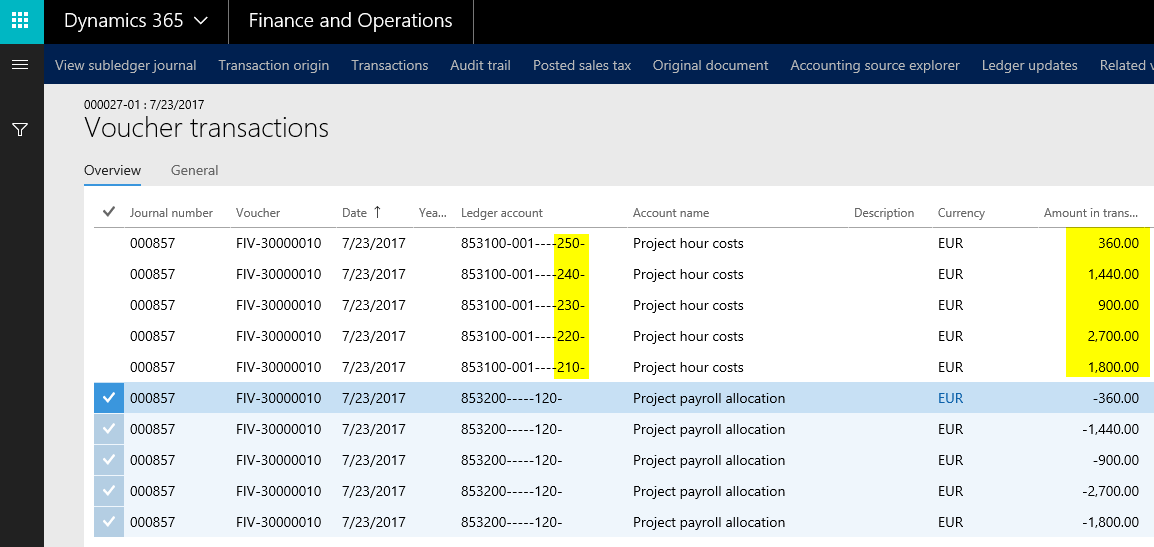
The voucher above shows that a project cost account (no. 853100) is – in combination with the operative cost centers – debited. The credit transaction is made on another profit and loss (P&L) account (no. 853200). As the debit and credit ledger accounts are both P&L accounts, no effect on company’s profit arises. However, because of the financial dimensions used, an allocation from the car pool cost center costs to the other direct cost centers occurs. This allocation effect is illustrated in the next figure.

  • A cost price of $180/hour has been setup in the project module for recording the project hours of the car pool manager.
  • From a cost accounting module perspective, the cost allocations made in the project module occur at the primary cost level. That is because the cost allocations are made outside of the cost accounting module
  • The cost center financial dimension of the car pool manager that is credited is set up at the employee level in the Human Resource module.


From the previous screenprint, one can identify that some costs remain at the car pool cost center no. 120. Those remaining costs are a sign that the cost price of $180/hour is not sufficient to allocate all costs from the car pool cost center to the other operative cost centers. Provided that the $180 is a market rate (price), the costs remaining on cost center no. 120 can be taken as a sign that the internal management of the car pool is more expensive compared to an external (outsourced) management of that cost center services.


Option 2: Cost accounting module

The second alternative for the cost allocation of the car pool cost center costs is the use of an overhead rate policy, which is exemplified in the next screenprint.
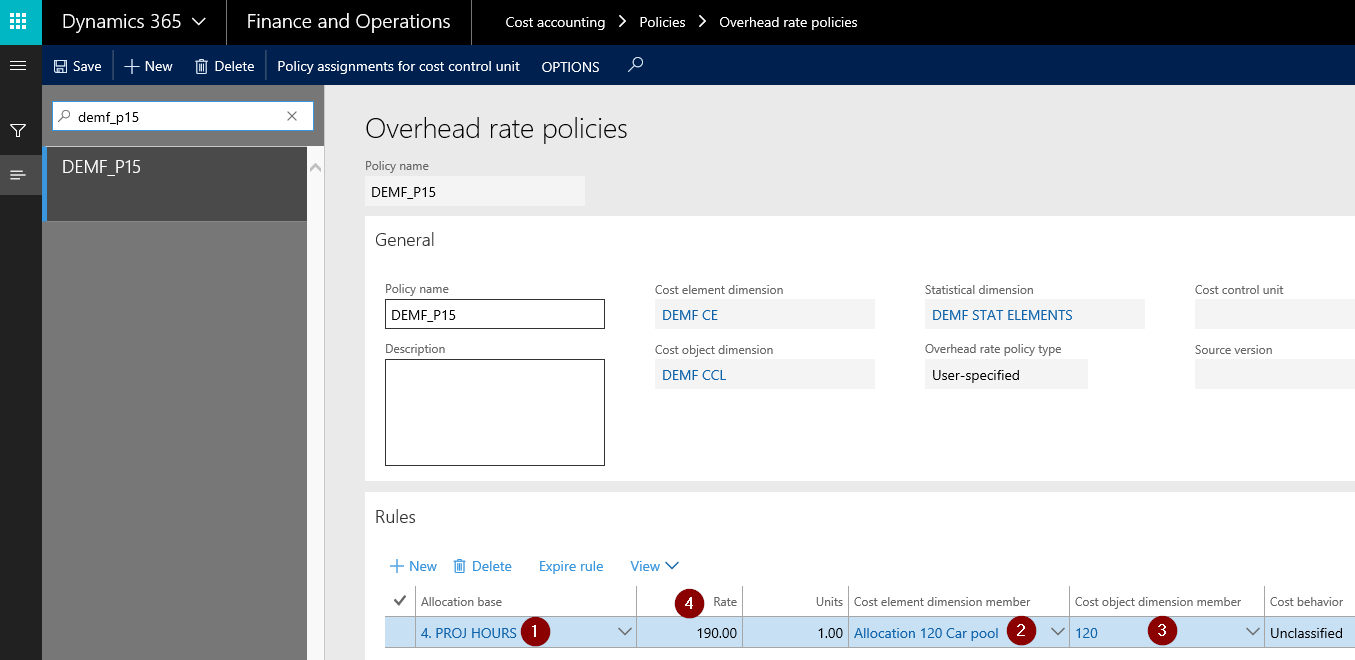
Making use of an overhead rate policy requires that a link to the statistical measure allocation base (‘4. PROJ HOURS’) is made (1). In addition, a secondary cost element that records the cost allocations (2) and the financial dimension to which the overhead rate is applied (3) need to be set up.

Most importantly, an overhead rate that is used for the creation of the cost allocations has to be determined (4). In the example shown above, a rate of $190 has been used to differentiate it from the cost rate that has been setup and used in the project module example shown before.

Similar to what has been shown in the previous post, a statistical measure provider template needs to be setup next for the transfer of the recorded project transactions (hours) to the cost accounting module.
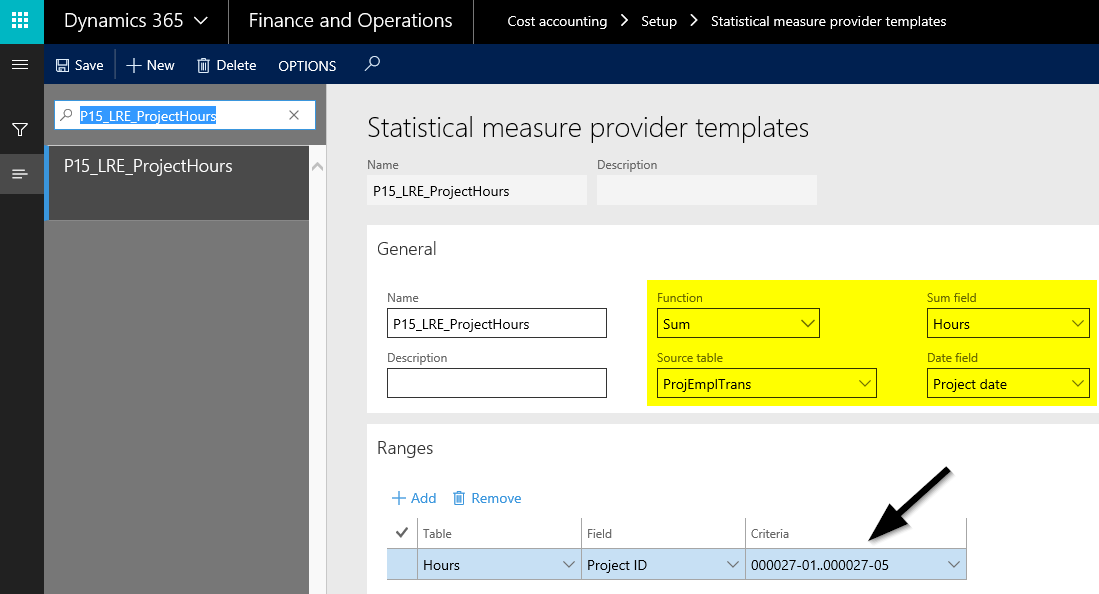
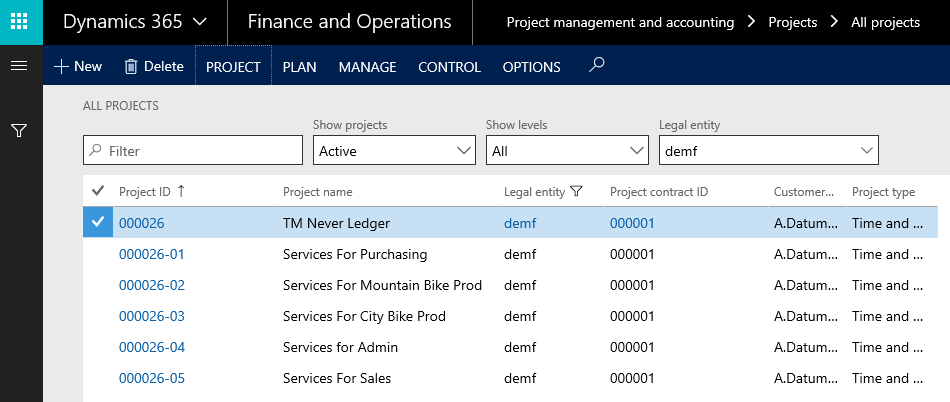
The only difference in the setup of the statistical measure provider template used in this post compared to the one used in the previous post is that a range for the newly set up projects has been specified. This is necessary because the hours of the cost center manager have – for illustrative purposes – been recorded twice; a first time at the projects ending with the number 26ff and a second time at the projects ending with the number 27ff.


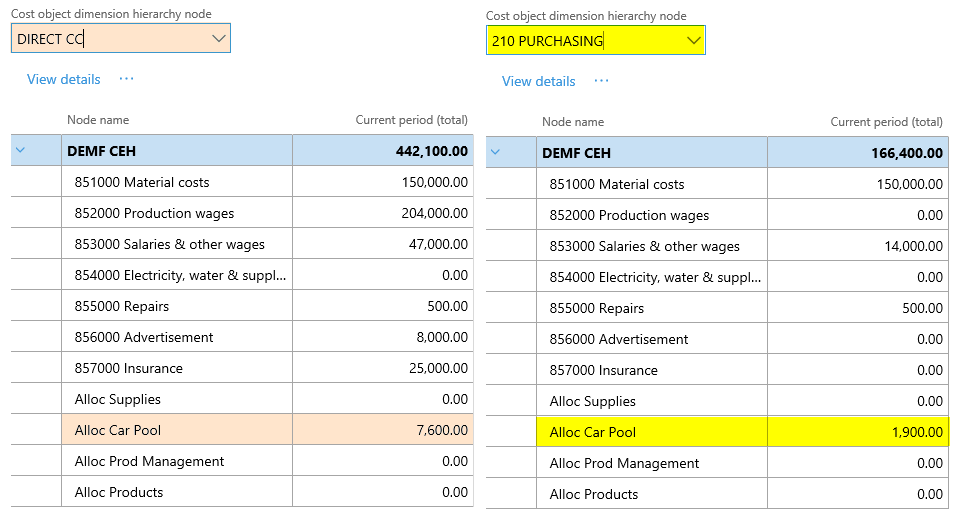
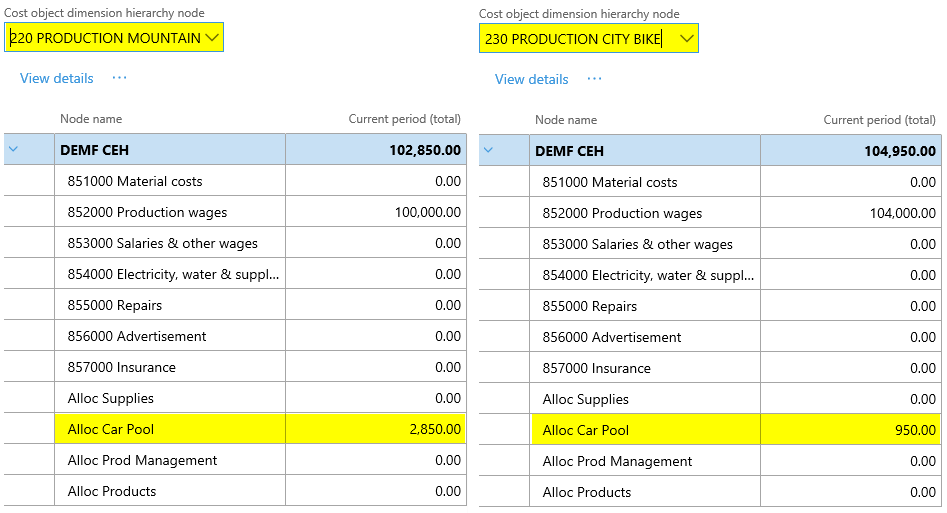
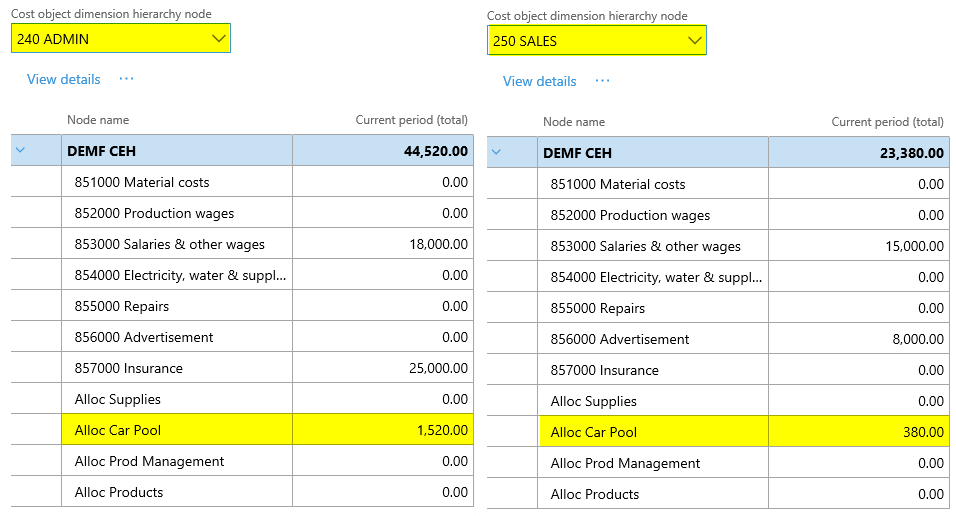
Processing the overhead rate policy through a cost accounting ledger results in the following costs for the different cost centers:
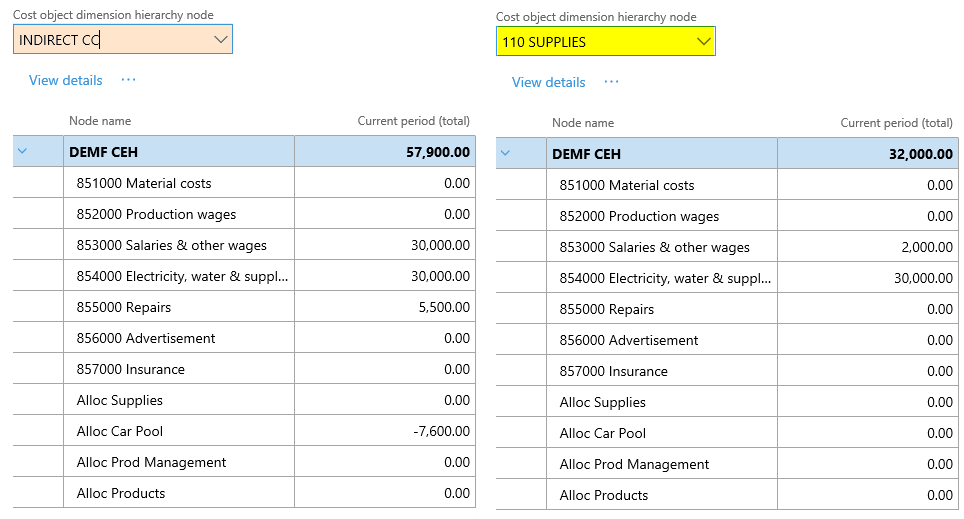
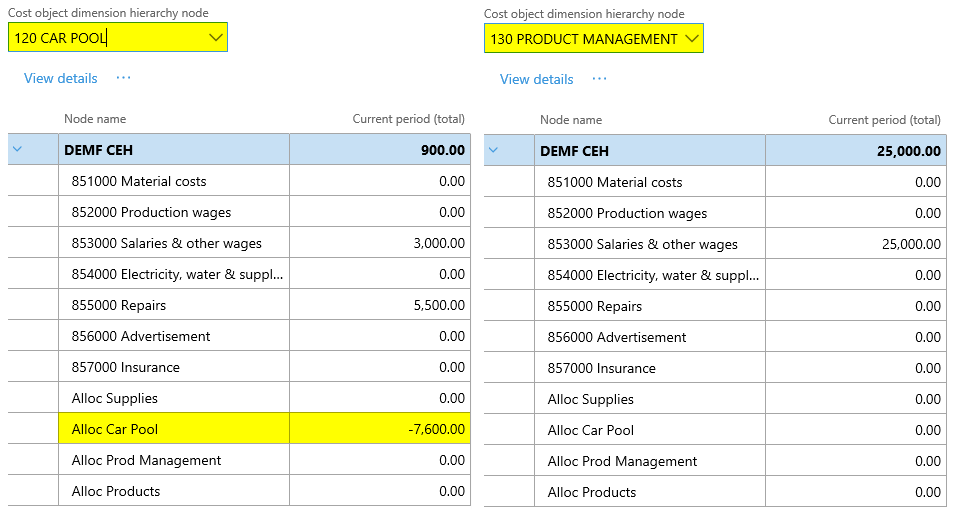
As shown in the previous posts, the next graphic summarizes the cost allocations made and the total costs that remain at the operative cost centers no. 210-250.
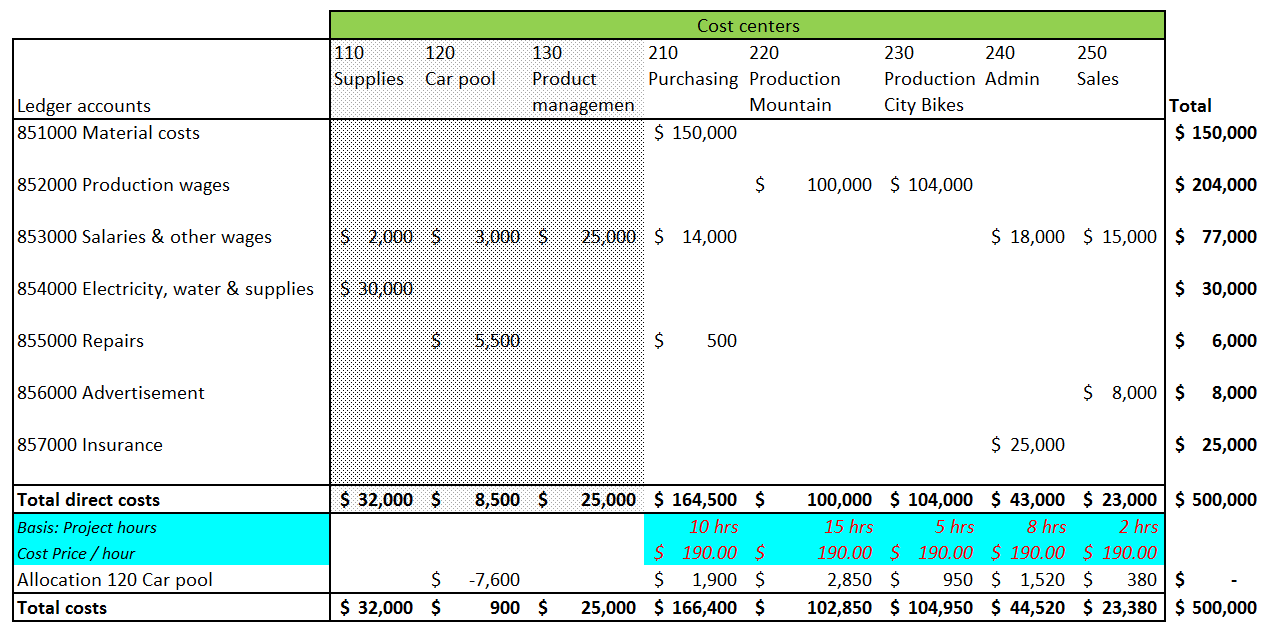
Please note that a rate of $190 is not sufficient for allocating all costs of the car pool cost center to the other ones. This can be identified by the $900 that remain at the car pool cost center after the allocations are made.


In the next post, we will investigate an approach that makes use of cost allocations in the project module and an overhead rate policy in the cost accounting module. Till then.

Cost accounting (14)

01 Wednesday Nov 2017

Posted by Ludwig Reinhard in Cost accounting

≈ Comments Off on Cost accounting (14)

Tags

Controlling, Cost accounting module, Cost center accounting, Management Accounting, Statistical measure provider templates

In this post, we will analyze how transactions – or more general records – that are entered in other D365 modules can be used as statistical measures for making cost allocations.

To illustrate how such cost allocations can be realized the same demo data that have been used in prior posts will be used again. However, this time, the costs of the car pool cost center no. 120 will be allocated to the other direct cost centers based on the hours that the cost center manager recorded in the project module. Details thereof as well as the allocation bases used can be found in the next screenprint.


Step 1: Record hours in the project module

For recording the hours of the car pool cost center manager, a project with several subprojects – one for each cost center – has been setup.

All projects used in this post are setup with a project group that does not generate a voucher for hour transactions. This has been realized by making use of the ‘never ledger’ project accounting integration setup. As a result, time recordings made in the project module record quantities only.

In a later post, a different project group will be used for the setup of projects that will result in the creation of ledger vouchers.


Step 2: Setup statistical measure provider template

Once all costs are recorded for the different projects, a statistical measure provider template is setup. This template is required to transfer the recorded project hour data into the cost accounting module.

When setting up this statistical measure provider template, one has to select the source table that holds the data, which will be used for the definition of the cost allocation basis. In the example used, the data are held in the ProjEmplTrans table (1). In addition to the table that holds the statistical data, one has to specify (2) the function (sum vs. count), (3) the sum field (hours) and (4) the date field (project date) in order to get the data correctly transferred into the cost accounting module.


Step 3: Setup statistical dimension measure

The next required setup for using the recorded project hours as statistical measure in the cost accounting module is the creation of a new statistical member (‘4. PROJ HOURS’), which is shown in the next screenprint.

The statistical dimension measure is needed for establishing a link between the statistical measure provider template and the cost accounting ledger. For details, see further below.


Step 4: Setup cost accounting ledger

Thereafter, the cost accounting ledger can be setup in the same way as it has been shown in the prior posts.

Please note the reference that is made to the statistical dimension ‘DEMF STAT ELEMENTS’, which includes the newly created statistical dimension member for the project hours.


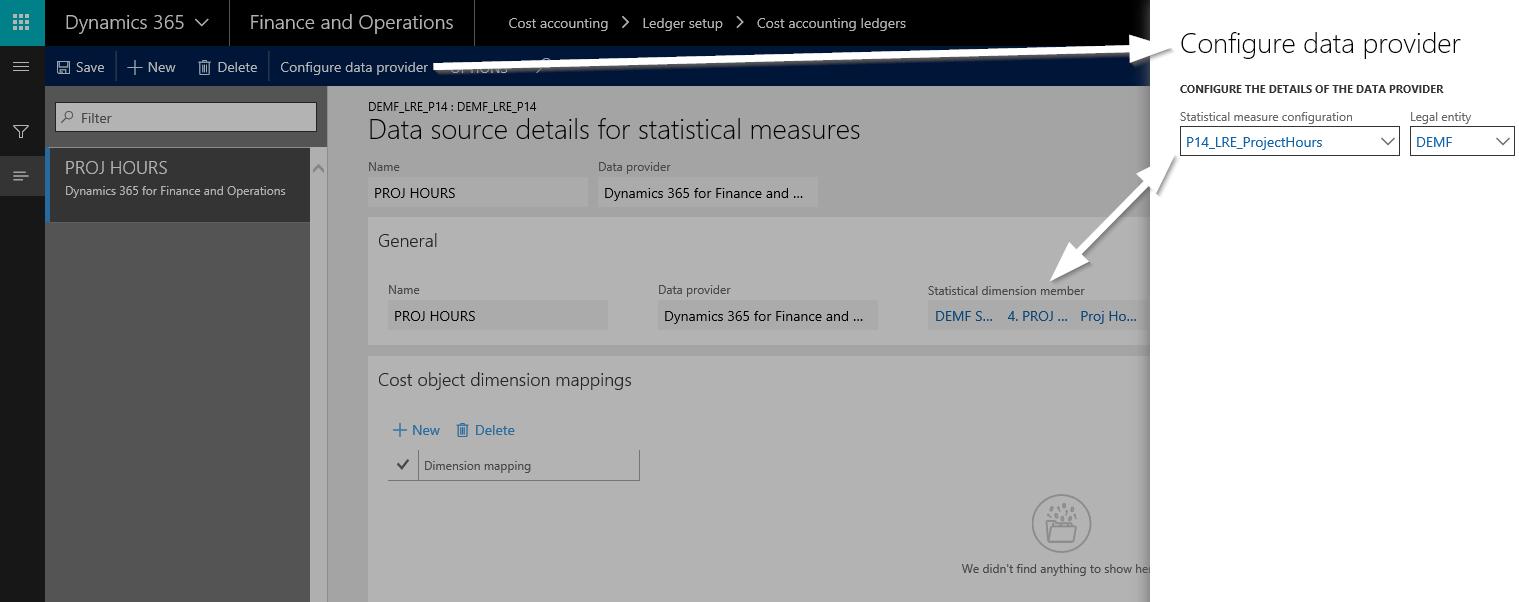
Setting up the cost accounting ledger necessitates the configuration of the statistical measure data providers. This configuration of the project hour related measure is shown in the next screenprint and requires that a link between the statistical dimension measure (‘4. PROJ HOURS’) from step 3 and the previously setup statistical measure provider template (‘P14_LRE_ProjectHours’) from step 2 is made.


Step 5: Create cost accounting policy

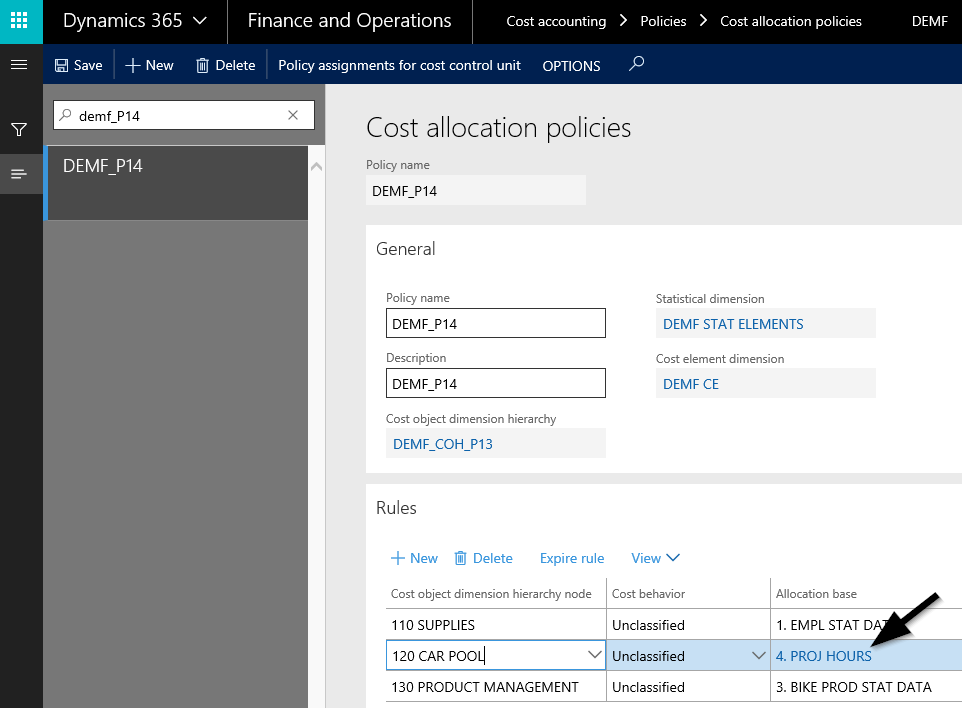
Finally, the cost allocation policies can be created. Please note that the cost allocation for the car pool cost center is made on the basis of the project hours recorded.


Step 6: Process data and overhead calculation

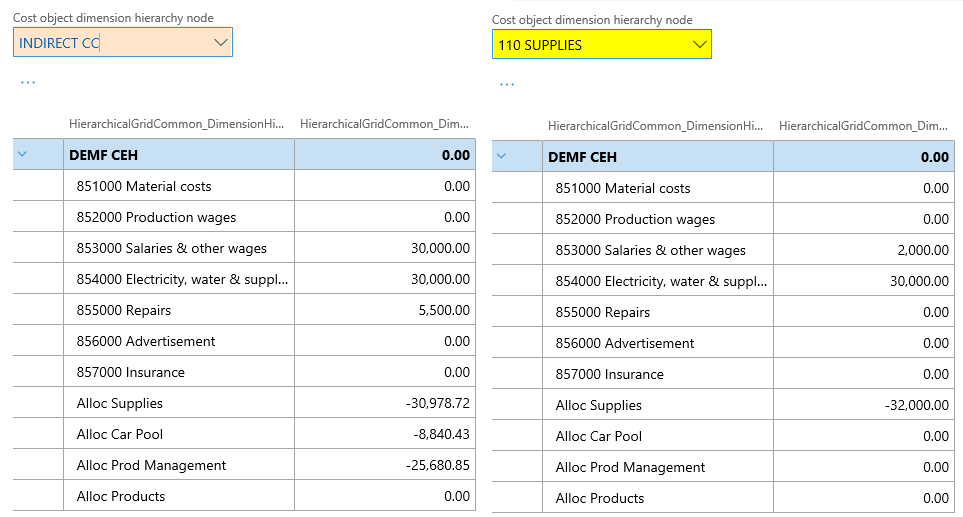
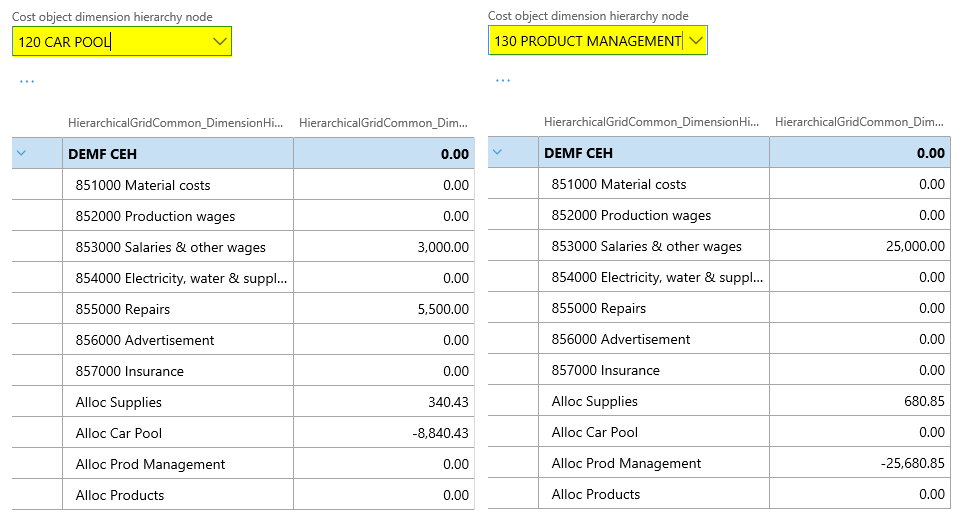
The outcome of processing the cost allocation policy on the sample data can be observed from the next screenprints.


In the next post, we will take a look at the overhead rate policies and how they can be used for making cost allocations. Till then.

Cost accounting (13)

22 Sunday Oct 2017

Posted by Ludwig Reinhard in Cost accounting

≈ Comments Off on Cost accounting (13)

Tags

Controlling, Cost accounting module, Cost center accounting, Cost distribution policies, Management Accounting

This post focuses on cost distribution policies and how they differ from cost allocation policies. According to the D365 documentation, cost distribution and cost allocation policies differ in a way that cost distributions always occur at the level of the primary cost element of the original costs.

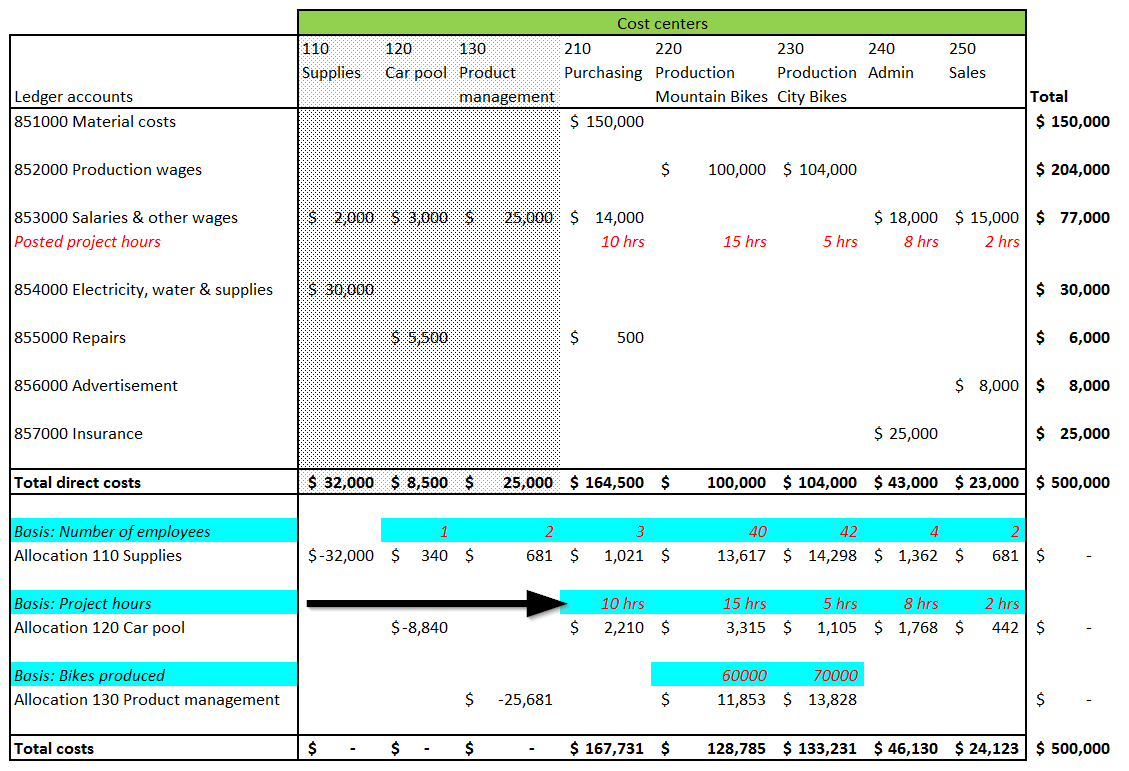
Applied to the previously used example, cost distribution policies should distribute the costs from the indirect cost centers to the direct ones, as indicated by the arrows shown in the next figure.

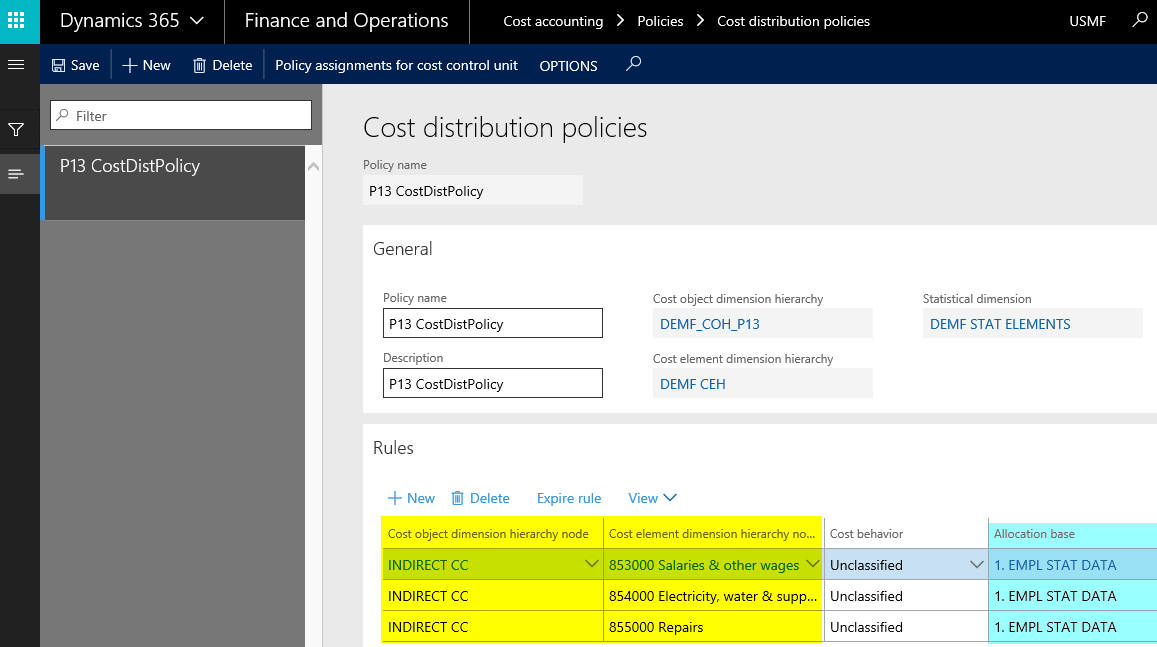
To verify this, the following cost distribution policy has been setup:

Please note from the previous screenprint that cost distribution policies also refer to a cost object dimension (‚INDIRECT CC’), as cost allocation policies do. Yet, different from cost allocation policies, a cost element node needs to be specified. The remaining cost behavior and allocation base columns are once again identical to what has been shown for cost allocation policies.

 The cost distribution policy used in this post makes once again use of the previously used employee related statistical allocation base.

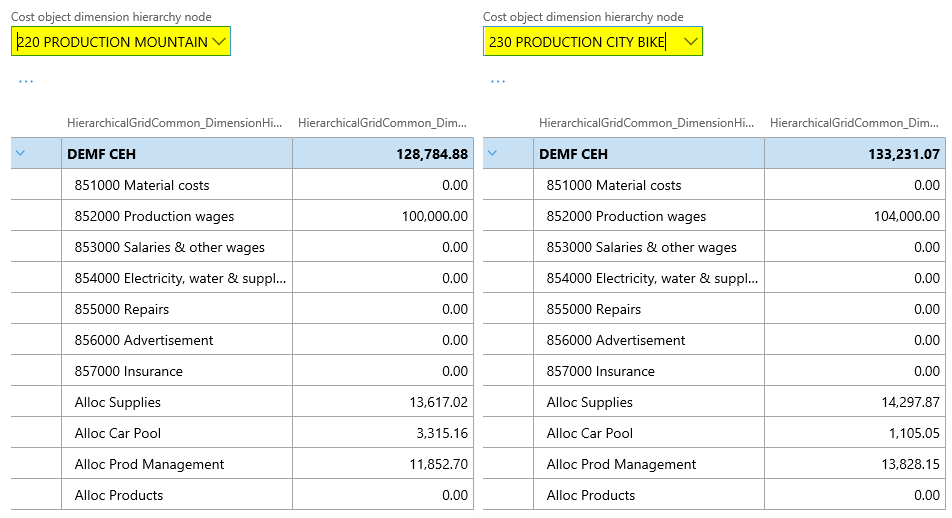
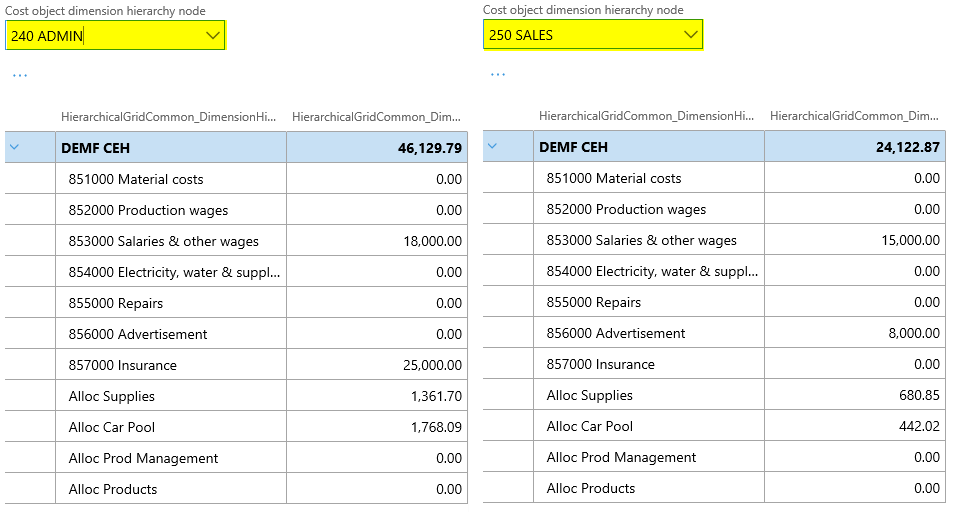
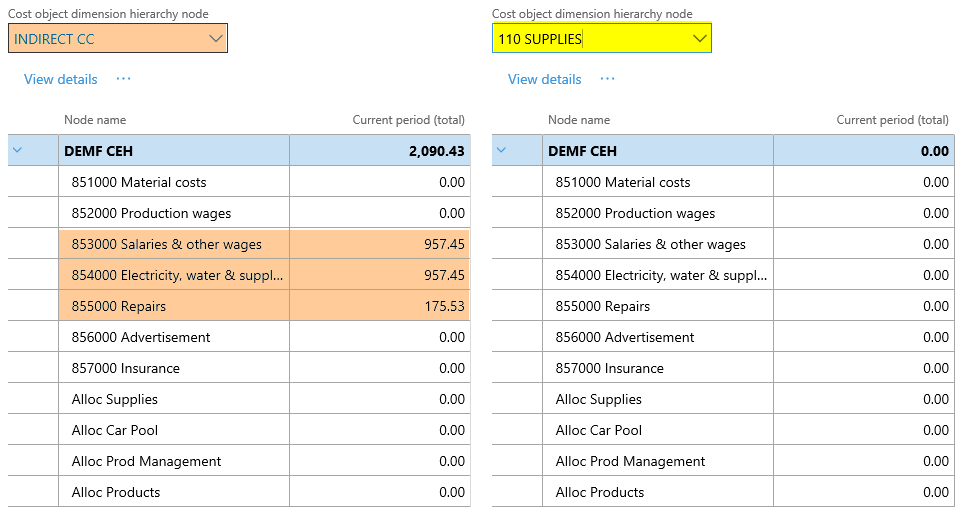
After setting up the cost accounting ledger and processing the data and the cost distribution policy, the following costs can be observed from the cost controlling workspace for the different indirect cost centers:

As one can identify from the prior screenprints, some costs remain at the indirect cost centers no. 120 and 130. The underlying reason for this outcome are cost distributions that are made within the group of the indirect cost centers. Those distributions are caused by the employee allocation basis used. The next graphical overview aims to illustrate the underlying issue.

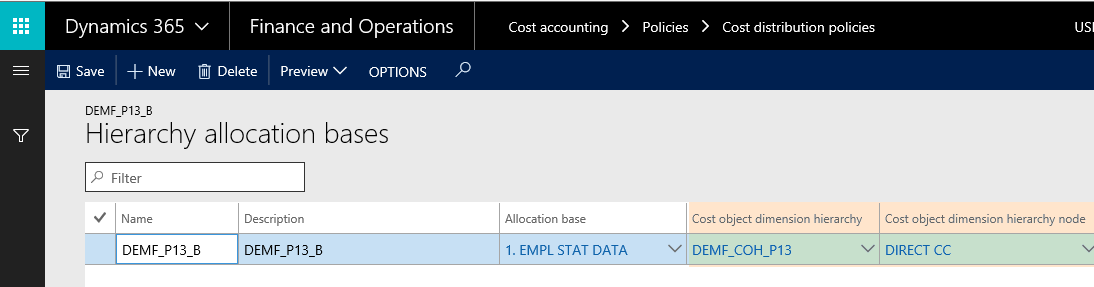
To avoid that costs remain at the indirect cost centers, the cost distribution policy is slightly modified in a way that a hierarchy allocation base (‚DEMF_P13_B’) is used.

 The major advantage of using a hierarchy allocation base is that one can specify to which cost objects cost distributions (or cost allocations) shall be made. In the example shown above, to the direct cost centers (‘DIRECT CC’) only.

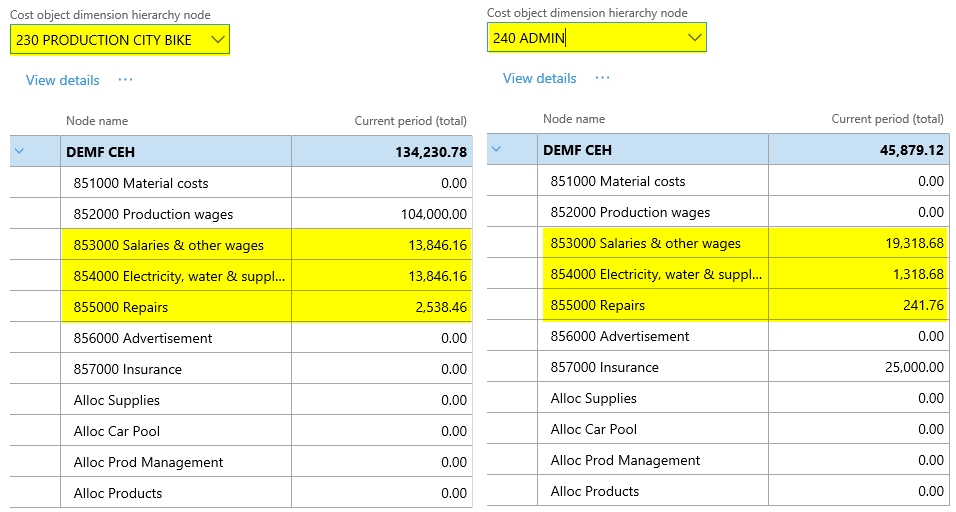
Reprocessing the cost distributions with the modified cost distribution policy finally results in the cost data shown in the next figures.

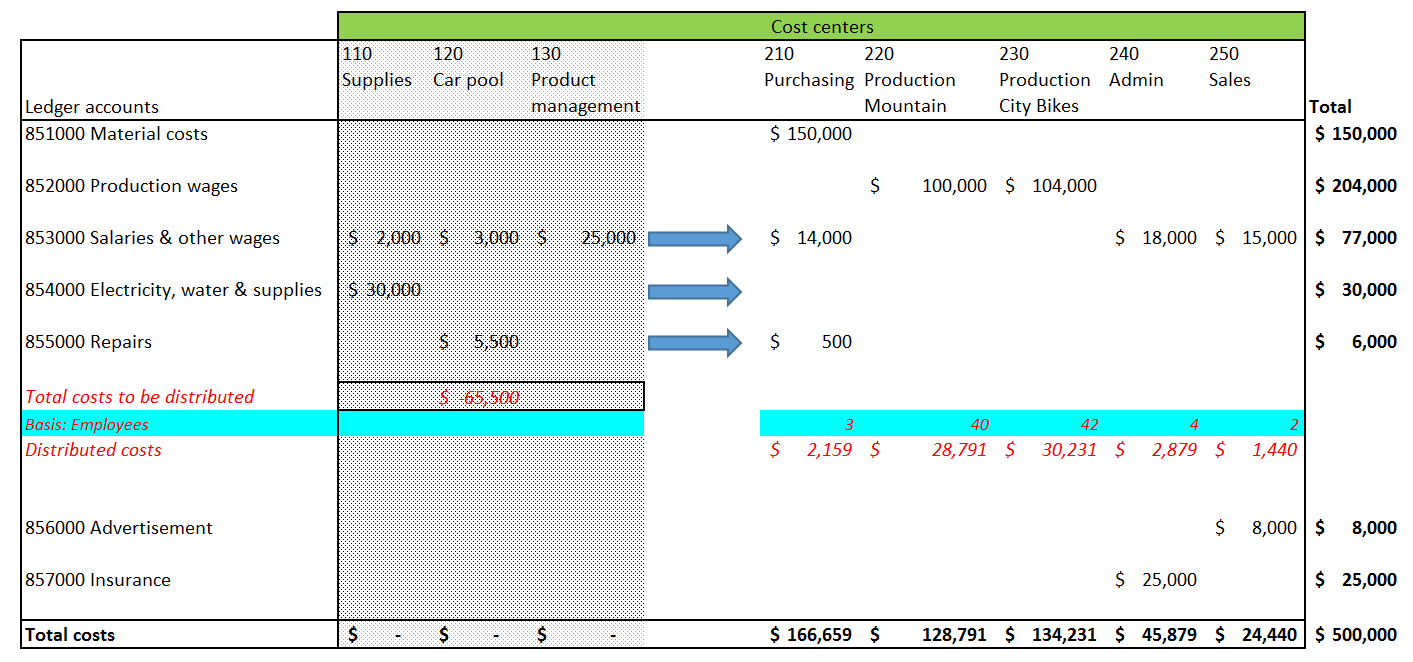
The next graphic has been prepared for a better overview of the cost distributions made.

Before ending this post, please note the following concluding remarks:

  1. The distributed costs won’t be shown as secondary costs even if a cost rollup policy is defined and assigned to the cost accounting ledger.
  2. The same outcome that has been shown above can be achieved by making use of a cost allocation policy that is not linked to a cost rollup policy.

The next post will introduce how to import statistical measure data from other D365 modules. Till then.

← Older posts
Newer posts →

Microsoft BizApps Deutschland Podcast

Dynamics UserGroup Deutschland

Project Accounting Book – Part 2

Project accounting book

Categories

  • Accounts Payable
  • Accounts Receivable
  • Bank Management
  • Book reviews
  • Budgeting
  • Cost accounting
  • Fixed Assets
  • General Ledger
  • Inventory
  • Management Reporter
  • Miscellaneous
  • Podcast
  • PowerPlatform
  • Project
  • Sustainability
  • Uncategorized

Tags

Advanced bank reconciliation AI Allocations Artificial Intelligence Automation Azure Bank reconciliation BizApps Budgeting Controlling Copilot Copilot Studio Cost accounting module Cost center accounting D365 D365FO Dynamics 365 Dynamics AX Dynamics AX 2012 Electronic reporting Email Environment Flow Global Warming invoice invoice recording IOT LEGO Management Accounting MS Flow MT940 PowerApps Power Apps PowerAutomate Power Automate PowerPlatform Power Platform Process Mining Project RPA Security SharePoint Sustainability Sustainability Accounting Sustainability Manager Tax time recording Vendor payments WBS workflow

Enter your email address to follow this blog and receive notifications of new posts by email.

Subcribe

  • RSS - Posts
  • RSS - Comments

Legal

  • Disclaimer

Important Websites

  • Microsoft BizApps Links

Archives

  • July 2025
  • June 2025
  • May 2025
  • April 2025
  • March 2025
  • February 2025
  • January 2025
  • December 2024
  • November 2024
  • October 2024
  • September 2024
  • August 2024
  • July 2024
  • June 2024
  • May 2024
  • April 2024
  • March 2024
  • February 2024
  • January 2024
  • December 2023
  • November 2023
  • October 2023
  • September 2023
  • August 2023
  • July 2023
  • June 2023
  • May 2023
  • April 2023
  • March 2023
  • February 2023
  • January 2023
  • December 2022
  • November 2022
  • October 2022
  • September 2022
  • August 2022
  • July 2022
  • June 2022
  • May 2022
  • April 2022
  • March 2022
  • February 2022
  • January 2022
  • December 2021
  • November 2021
  • October 2021
  • September 2021
  • August 2021
  • July 2021
  • June 2021
  • May 2021
  • April 2021
  • March 2021
  • February 2021
  • January 2021
  • December 2020
  • November 2020
  • October 2020
  • September 2020
  • August 2020
  • July 2020
  • June 2020
  • May 2020
  • April 2020
  • March 2020
  • February 2020
  • January 2020
  • December 2019
  • November 2019
  • October 2019
  • September 2019
  • August 2019
  • July 2019
  • June 2019
  • May 2019
  • April 2019
  • March 2019
  • February 2019
  • January 2019
  • December 2018
  • November 2018
  • October 2018
  • September 2018
  • August 2018
  • July 2018
  • June 2018
  • May 2018
  • April 2018
  • March 2018
  • February 2018
  • January 2018
  • December 2017
  • November 2017
  • October 2017
  • September 2017
  • August 2017
  • July 2017
  • June 2017
  • May 2017
  • April 2017
  • March 2017
  • February 2017
  • January 2017
  • December 2016
  • November 2016
  • October 2016
  • September 2016
  • August 2016
  • July 2016
  • June 2016
  • May 2016
  • April 2016
  • March 2016
  • February 2016
  • January 2016
  • December 2015
  • November 2015
  • October 2015
  • September 2015
  • August 2015
  • July 2015
  • June 2015
  • May 2015
  • April 2015
  • March 2015
  • February 2015

Blog at WordPress.com.

  • Subscribe Subscribed
    • Microsoft BizApps Finance & Controlling
    • Join 620 other subscribers
    • Already have a WordPress.com account? Log in now.
    • Microsoft BizApps Finance & Controlling
    • Subscribe Subscribed
    • Sign up
    • Log in
    • Report this content
    • View site in Reader
    • Manage subscriptions
    • Collapse this bar
 

Loading Comments...