• Home
  • About Me
  • Contact
  • German
  • TestPage

Microsoft BizApps Finance & Controlling

Microsoft BizApps Finance & Controlling

Tag Archives: Inventory reconciliation

Inventory reconciliation (Inventory value report) – Part 1/3

11 Friday Sep 2015

Posted by Ludwig Reinhard in General Ledger, Inventory

≈ Comments Off on Inventory reconciliation (Inventory value report) – Part 1/3

Tags

Dynamcis AX, Inventory reconciliation, Inventory value report

If you ever tried to reconcile your inventory balances with your ledger balances, you might have come across the inventory value report. This report and its setup is described in many blog posts and white papers. Yet, despite all the available information, the setup of this report often remains unclear for many finance users due to the numerous setup options and missing “best practice” guidelines.

This posts aims to close this gap by focusing on the different setup parts of the report and by providing you with some specific finance backgrounds on the selection of the one or the other report parameter. For this purpose, I divided the report setup into the following five blocks: EN_22_001
(Please note that this blog post will be split into three separate blog posts for reasons of readability and due to its length).

Block 1:
EN_22_002

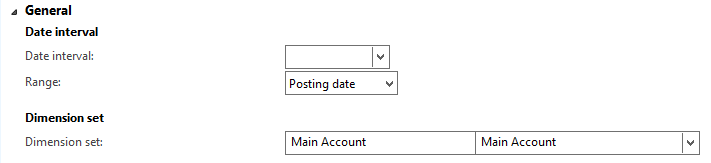
Date interval:
Setup the default date interval that is pre-populated when opening the inventory value report

Range:
Select “posting date” or “transaction date”. Note that the transaction date option was introduced with the moving average inventory valuation model. For additional details, see this website.

Dimension set:
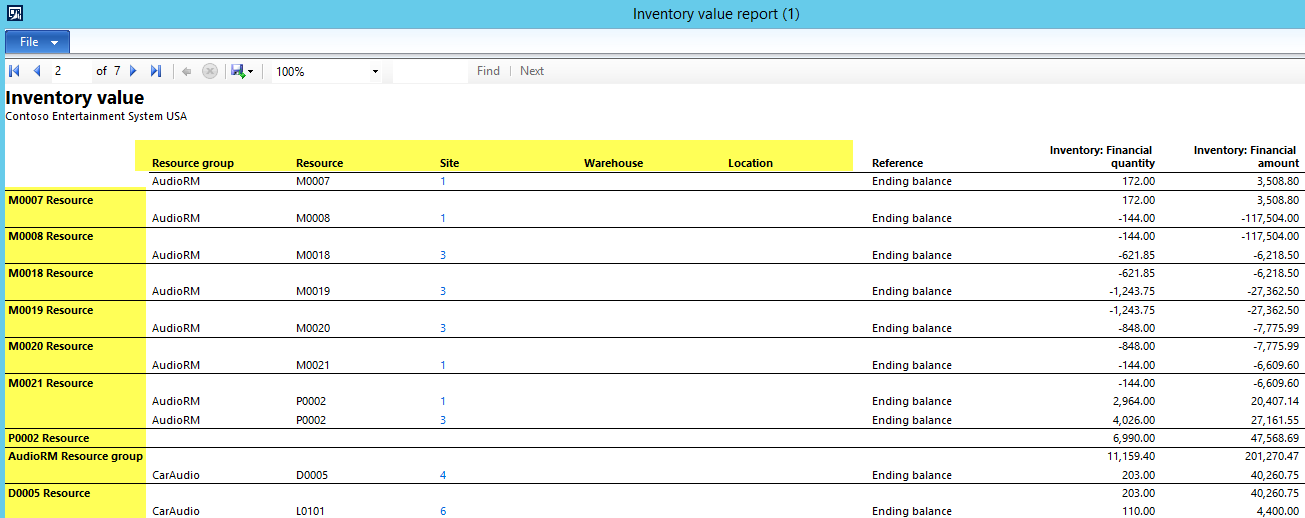
The dimension set allows you – in combination with the column setup of the inventory value report (see further below) – a direct comparison of the inventory and the ledger balances. This is realized by showing a financial section at the end of the report. See the following screenshot for an example.
EN_22_003

Best practice:
Running the inventory value report with the main account financial dimension set is fine as long as no difference between the inventory values and ledger balances exist. Yet, once the report shows a discrepancy, running the report with a dimension set consisting of the main account and item ID can help you identifying the discrepancy faster. Example: EN_22_004

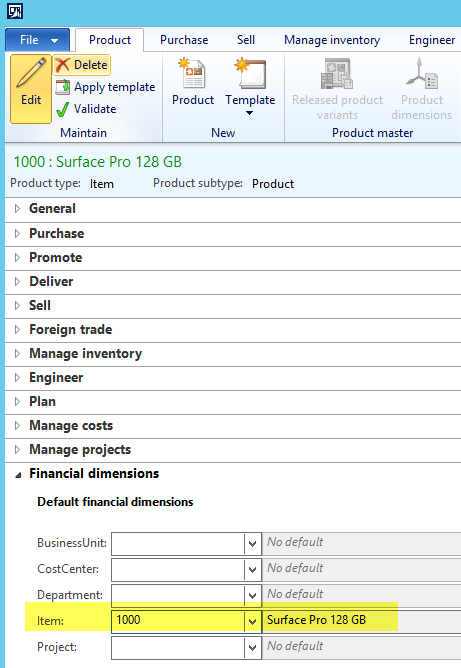
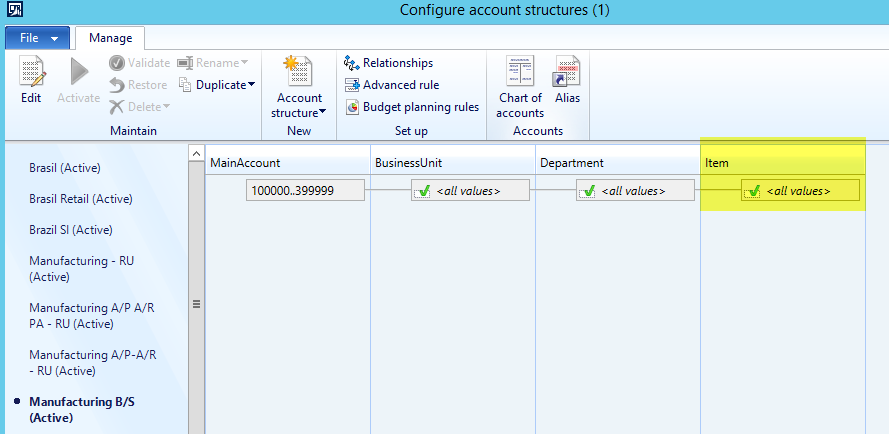
Please note that running the inventory value report with the main account and item ID financial dimension set requires that the General Ledger account structures include the item ID as a financial dimension and that all items are setup with their item IDs as illustrated in the next screenshots.
EN_22_006
EN_22_005_new


Block 2:
The parameters that you define in the inventory dimensions block influence the inventory dimensions, items, item groups and subtotals shown in the inventory value report.
EN_22_008

Example: EN_22_009

Please note that this setup needs to be in line with the setup of the storage dimension groups. As an example, selecting the “Palled ID” dimension does not make much sense if financial inventory values are not tracked at this level.
EN_22_010

From a “best practice” perspective, the setup of different inventory value reports with different levels of details can help you identifying discrepancies faster and easier by successively running the different report versions.
EN_22_011

…to be continued in the next post.

Newer posts →

Microsoft BizApps Deutschland Podcast

Dynamics UserGroup Deutschland

Project Accounting Book – Part 2

Project accounting book

Categories

  • Accounts Payable
  • Accounts Receivable
  • Bank Management
  • Book reviews
  • Budgeting
  • Cost accounting
  • Fixed Assets
  • General Ledger
  • Inventory
  • Management Reporter
  • Miscellaneous
  • Podcast
  • PowerPlatform
  • Project
  • Sustainability
  • Uncategorized

Tags

Advanced bank reconciliation AI Allocations Artificial Intelligence Automation Azure Bank reconciliation BizApps Budgeting Controlling Copilot Copilot Studio Cost accounting module Cost center accounting D365 D365FO Dynamics 365 Dynamics AX Dynamics AX 2012 Electronic reporting Email Environment Flow Global Warming invoice invoice recording IOT LEGO Management Accounting MS Flow MT940 PowerApps Power Apps PowerAutomate Power Automate PowerPlatform Power Platform Process Mining Project RPA Security SharePoint Sustainability Sustainability Accounting Sustainability Manager Tax time recording Vendor payments WBS workflow

Enter your email address to follow this blog and receive notifications of new posts by email.

Subcribe

  • RSS - Posts
  • RSS - Comments

Legal

  • Disclaimer

Important Websites

  • Microsoft BizApps Links

Archives

  • July 2025
  • June 2025
  • May 2025
  • April 2025
  • March 2025
  • February 2025
  • January 2025
  • December 2024
  • November 2024
  • October 2024
  • September 2024
  • August 2024
  • July 2024
  • June 2024
  • May 2024
  • April 2024
  • March 2024
  • February 2024
  • January 2024
  • December 2023
  • November 2023
  • October 2023
  • September 2023
  • August 2023
  • July 2023
  • June 2023
  • May 2023
  • April 2023
  • March 2023
  • February 2023
  • January 2023
  • December 2022
  • November 2022
  • October 2022
  • September 2022
  • August 2022
  • July 2022
  • June 2022
  • May 2022
  • April 2022
  • March 2022
  • February 2022
  • January 2022
  • December 2021
  • November 2021
  • October 2021
  • September 2021
  • August 2021
  • July 2021
  • June 2021
  • May 2021
  • April 2021
  • March 2021
  • February 2021
  • January 2021
  • December 2020
  • November 2020
  • October 2020
  • September 2020
  • August 2020
  • July 2020
  • June 2020
  • May 2020
  • April 2020
  • March 2020
  • February 2020
  • January 2020
  • December 2019
  • November 2019
  • October 2019
  • September 2019
  • August 2019
  • July 2019
  • June 2019
  • May 2019
  • April 2019
  • March 2019
  • February 2019
  • January 2019
  • December 2018
  • November 2018
  • October 2018
  • September 2018
  • August 2018
  • July 2018
  • June 2018
  • May 2018
  • April 2018
  • March 2018
  • February 2018
  • January 2018
  • December 2017
  • November 2017
  • October 2017
  • September 2017
  • August 2017
  • July 2017
  • June 2017
  • May 2017
  • April 2017
  • March 2017
  • February 2017
  • January 2017
  • December 2016
  • November 2016
  • October 2016
  • September 2016
  • August 2016
  • July 2016
  • June 2016
  • May 2016
  • April 2016
  • March 2016
  • February 2016
  • January 2016
  • December 2015
  • November 2015
  • October 2015
  • September 2015
  • August 2015
  • July 2015
  • June 2015
  • May 2015
  • April 2015
  • March 2015
  • February 2015

Blog at WordPress.com.

  • Subscribe Subscribed
    • Microsoft BizApps Finance & Controlling
    • Join 619 other subscribers
    • Already have a WordPress.com account? Log in now.
    • Microsoft BizApps Finance & Controlling
    • Subscribe Subscribed
    • Sign up
    • Log in
    • Report this content
    • View site in Reader
    • Manage subscriptions
    • Collapse this bar
 

Loading Comments...