
In my last post I illustrated a standard functionality that allows allocating indirect costs, such as licensing costs to projects. While the major focus in the earlier post was on intra-company cost allocations, I would like to extend the focus in this post by taking a look at standard functionalities that allow intercompany cost allocations for projects.
Rather than trying to illustrate those functionalities from a pure technical, rather abstract perspective, I decided to take a look at project related intercompany cost allocations based on the following three examples.
Example 1: Employees engaged in company USSI work on projects in company FRSI
Part A: Scenario
Within this first example I will take a look at the standard intercompany timesheet functionality that allows employees recording times on projects that are setup in different companies without having to change the company. You might have read some posts about this feature before. Yet, irrespective of that and risking that you have already heard / read about it, I would nevertheless like to start with this elementary example, as it establishes the basis for the following, more complex intercompany cost allocation scenarios.
In this first example I assume that an employee engaged in company USSI is doing some software installation work for a customer project that is setup in company FRSI. In order to allow the USSI employee recording her time on the FRSI project and to charge FRSI for the hours worked, the following setup is required.
Part B: System setup
Setup B.1: Intercompany customer – vendor relationship
The first thing that needs to be setup is an intercompany relationship between a customer and vendor account, which is required for recording the intercompany cost and invoice transactions later on. The next screen-print exemplifies this setup for the intercompany customer account in company USSI.

Note: When establishing the intercompany customer-vendor account relationship you need to ensure that those accounts are setup with a financial intercompany dimension as illustrated above. That is because the project posting profiles do not allow setting up ledger accounts based on a company criteria. If you decide not making this kind of setup, the consolidation of your financial results might get more complex later on. For details, please see further below.
Setup B.2: Project category
The next setup required is related to the project categories. In this respect you have to ensure that the category that you need for recording the hour transactions is setup in both companies.

Note: If the category is not setup in both companies, Dynamics AX will show the following error message and won’t let you continue processing your transaction until the error is resolved.

Setup B.3: Intercompany accounting
Once all project categories required have been setup, an intercompany accounting relationship between the companies involved in the transaction needs to be established, as illustrated in the next screen-print.

Establishing this relationship is not required for creating timesheet and/or intercompany postings but rather for allowing users selecting the different companies in the timesheet form.
Please note that if the intercompany accounting relationship between USSI and FRSI is missing, employees working in USSI cannot select and post their hours on projects that are setup in FRSI. The next screen-print illustrates this.

Setup B.4: Project setup company FRSI
When setting up the project in FRSI, it has to be ensured that the project is linked to a financial intercompany dimension. Otherwise, the separation and identification of intercompany transactions during the financial consolidation process might become difficult.
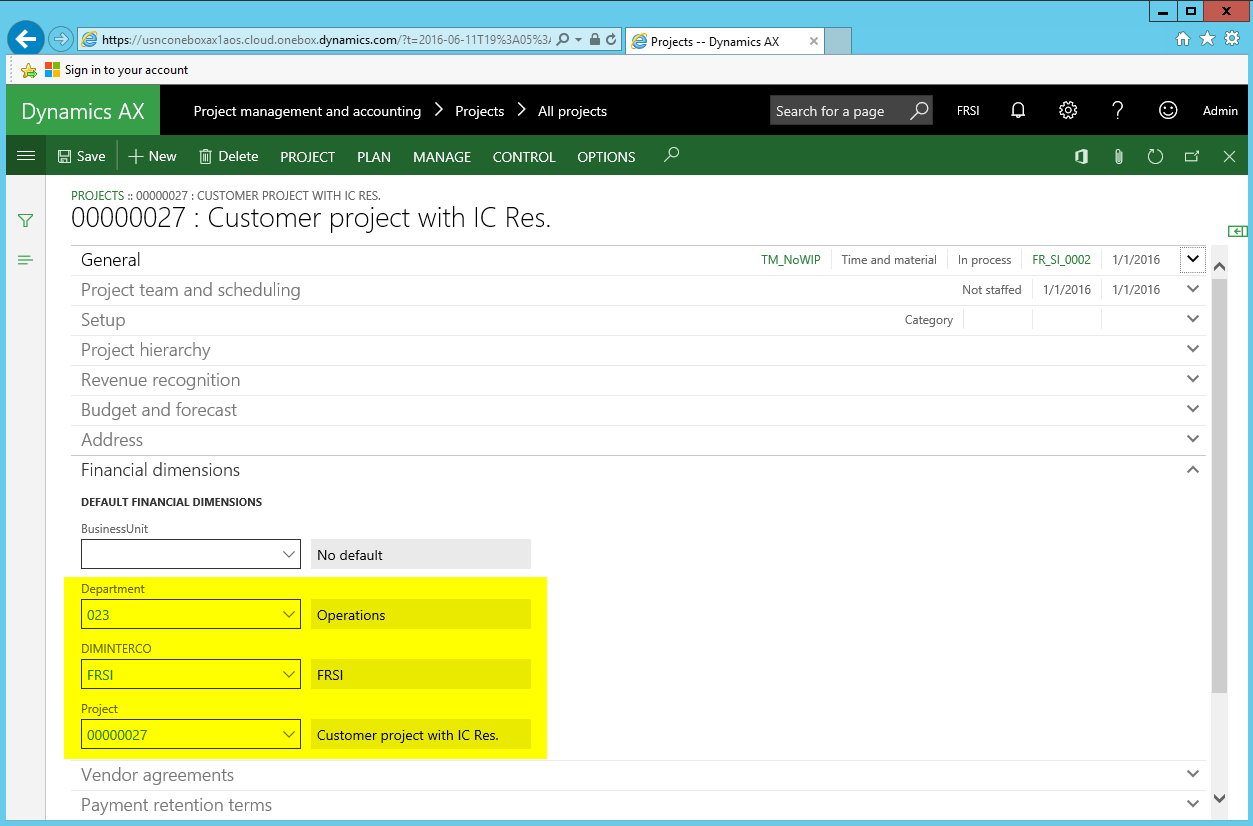
Please note that the other financial dimensions used in this example (Department 023 and Project 00000027) are not necessarily required for the time recording process. They have, nevertheless been setup here for illustrative purposes in regards to the vouchers created. For details, please see further below.
Setup B.5: Employee setup company USSI
After setting up the project in FRSI, the employee engaged in company USSI is setup. This setup does not require some special considerations except that it is advisable linking the employee to its department / cost center and intercompany financial dimension, as exemplified in the next screen-print.

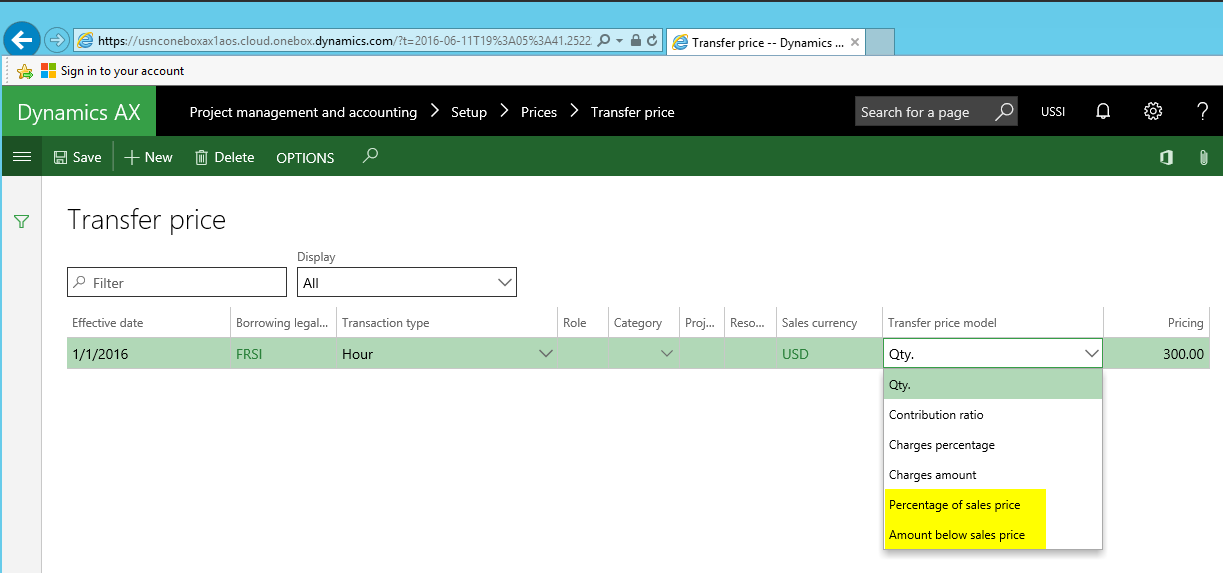
Setup B.6: Intercompany sales price
Setting up intercompany transfer prices for hours recorded is something easy from a pure technical system perspective, as the only thing required is entering a price that will be charged to the other company for the hours worked.
From an accounting and taxation perspective things are, however, more complex when it comes to the setup of intercompany transfer prices in an international company environment. This complexity is mainly caused by a number of (sometimes differing) intercompany transfer pricing rules applicable in the countries involved in the intercompany trading relationship. Within the context of this post it is impossible illustrating you even the most basic intercompany transfer-pricing regulations. For that reason reference is made to the general international transfer-pricing framework – the OECD transfer pricing guidelines. Based on the OECD guidelines overarching “arm’s length” transfer pricing principle, an intercompany sales price of 300 USD is setup and used in this example for the subsequent hour transactions recorded.

Please note that Dynamics AX allows determining intercompany transfer prices based on the sales price that external customers are charged for through the selection of one of the following (yellow-highlighted) transfer pricing models.
Part C: Process steps
Step C.1.: Process intercompany time sheet
With all those setups in place, the USSI employee can record her hours in the timesheet form as usual by referring to the company and project she worked for. Please note that this selection defaults the financial dimension values of the intercompany project in the timesheet form, as illustrated in the next screen-print.

The resulting voucher records the cost and payroll allocation in USSI. Notable in regards to the voucher created are the financial dimension values that are recorded together with the cost account (540100) and the payroll allocation account (602100).

Step C.2.: Post intercompany project invoice
The next process step consists of creating the intercompany project invoice in company USSI. This can be realized by using the corresponding intercompany project invoice functionality. Example:

Once all transactions to be invoiced are selected and posted…
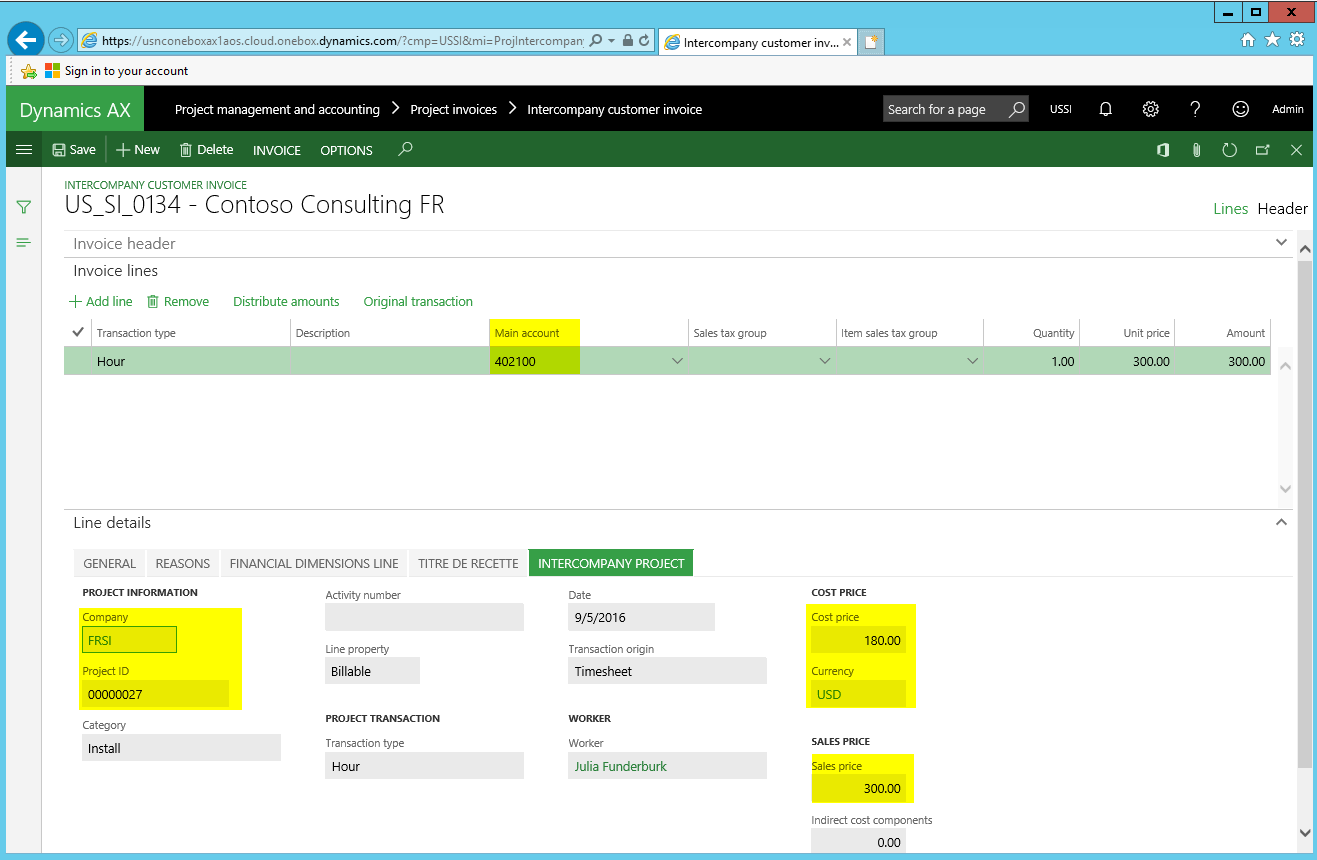
… the following intercompany invoice voucher results.

Please note that the intercompany receivable account (133100) is determined by the customer posting profile setup in the Accounts Receivable module. The intercompany sales revenue account (402100) on the other hand, is determined by the corresponding account setup in the project module ledger posting form.
Step C.3.: Post pending vendor invoice FRSI company
At the time the intercompany project customer invoice is posted in company USSI, a corresponding intercompany vendor invoice is created in company FRSI that can be found in the pending invoice section of the Accounts Payables module.

Posting this invoice results in the following voucher.

(Please note that the USSI and FRSI companies use different Chart of Accounts).
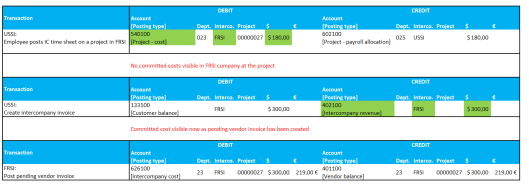
In order to differentiate between the different transactions posted, the following accounting overview has been created:

What can be identified from the illustration above is:
- First, that the costs for the hours recorded in company USSI cannot be identified at the project level in company FRSI – at least as committed costs – until the intercompany project invoice and pending vendor invoice have been created.
- Second, that the orange and yellow highlighted transactions can easily be identified in the financial consolidation process due to the financial intercompany dimension used. (Please note that the financial intercompany dimension (“FRSI”) used when creating the intercompany invoice is determined by the setup of the intercompany customer account illustrated in setup step no. 1 further above. The financial intercompany dimension that is used when recording the costs and intercompany vendor invoice is, on the other hand, determined by the project setup in company FRSI.)
- Third, that a comparison of the cost and (inter-company) revenue – highlighted in green color in the next screen-print – allows an easy identification and comparison of the intercompany profit made in the internal transaction. This helps users checking and justifying the appropriateness of the company’s transfer pricing policy e.g. against auditors.

Note: As indicated above, the setup of financial intercompany dimension values is crucial for the whole intercompany process. That is because the project module ledger posting setup does not allow specifying intercompany cost and revenue accounts based on companies involved in the trading relationship. Please see the next screen-print for details.

What happens if the financial intercompany dimension is missing at the project level can be identified in the next illustration.
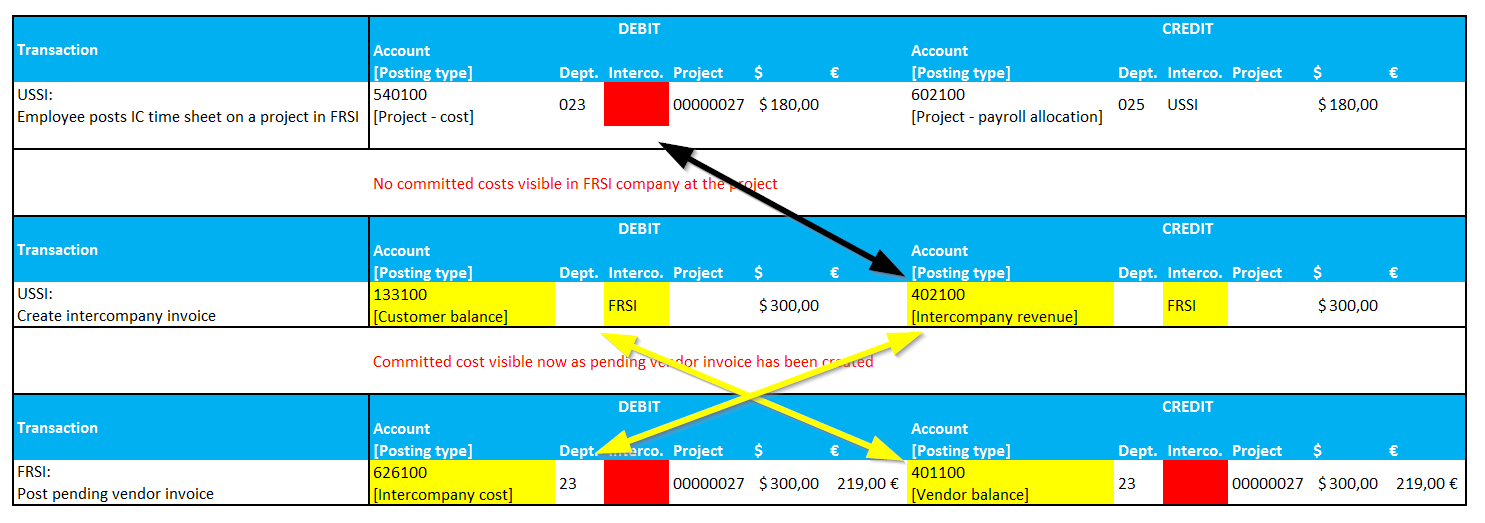
The arrows and red highlighted fields above highlight the missing financial intercompany dimensions that cause problems when it comes to the financial consolidation of the intercompany accounts – especially if several companies are involved in the inter-company trading relationship.
In addition, also a check of the appropriateness of the intercompany transfer pricing policy will get more complex if the financial intercompany dimension is missing, as the project cost and project revenue postings cannot easily brought together.
Intermediate result
I hope that this post gave you some new insights into the intercompany timesheet functionality even if you have already heard & read something about this feature before.
Against the background of this standard functionality, let’s continue then by having a look at some other, more complex, project related intercompany cost allocation scenarios in the next part.
 Microsoft BizApps Finance & Controlling